
AVIX is a complete software package designed for analysis and optimization of processesIt is a process mapping tool that helps companies increase profitability by improving the efficiency of manufacturing engineering in areas such as production optimization, manufacturing efficiency, product development, and manufacturability. A major challenge for many companies is what could be called “engineering productivity.” It is administratively and time-consuming for engineering departments to keep all methods, lean tools, and documents valid and up to date at the place where they are needed. Therefore, manufacturing companies around the world use AVIX for time studies, workstation/line balancing, FMEA, SMED, creation of work instructions, and DFA. AVIX software helps hundreds of companies improve lean manufacturing. It thus ensures what can be called efficiency of manufacturing engineeringAVIX is able to ensure:
- Production improvement – the analysis results in AVIX make it easier to identify problems within the process and visually show the potential for process improvement.
- Reduction of time spent updating data – all data in AVIX are interconnected. A change in the assembly sequence is immediately reflected, for example, in
- More results in less time – when performing an analysis in AVIX, you are not creating only a time study. At the same time, you are also creating data for workstation balancing and the creation of work instructions.
AVIX modules

AVIX METHOD

AVIX RESOURCE BALANCE
You can conveniently divide individual work operations between different workplaces and individual operators. AviX allows you to analyze operations in the operator-machine relationship, manual-machine work. The outputs is a balanced process.

AVIX FMEA

AVIX SMED

AVIX DFX

AVIX ERGO
Standardized work = a prerequisite for improvement
Standardized work is one of the fundamental pillars of Lean management. Common problems in manufacturing and logistics processes that cause low efficiency and poor productivity include:
- Absence of working instructions (relying on the operator's experience that he to handle the job most efficient way without wasting)
- Outdated work instructions (especially if there are frequent changes in work procedures or if it is necessary to update work instructions across many workstations)
- Different workflows between work changes (different procedure for morning change, different for night change)
- Failure to follow working instructions (usually, when there is a problem completing a work operation within the required takt time, the operator tries to speed up the activity; another reason may be a work procedure that includes inefficient activities – waste)


End of inefficient work in MS Excel!
Creating work standards using traditional tools such as MS Excel or other spreadsheet or text editors is time-consuming. At the same time, using general-purpose tools is prone to errors (whether due to inattention, lack of clarity, data overwriting, or failure to link the analysis with the work process, etc.).
Modul AVIX Method is based on the analysis of video recordings of the process and is specifically designed for work analysis and measurement. Thanks to this approach, process analysis, waste elimination, and the creation of work instructions become fast and simple. AVIX Method guarantees a reduction of at least 45% in the time required to create work instructionsIt also makes it easier to identify areas with the greatest potential for further improvement. By creating work instructions in AVIX Method is just one step toward digital work instructions created without the need for paper (paperless work instruction) and for displaying work instructions digitally directly at the workstations through AVIX Shop Floor Viewer.
AVIX Method – Capabilities
- Video-based process analysis
- Graphical division of time into added value, desired, waiting and loss
- Identification of waste in processes
- Ability to assign the necessary material and tools to operations
- Creation of work instructions with varying levels of detail
- Generation of reports from work instructions in various formats
- Creating digital work instructions for subsequent publishing directly to workplaces


AVIX Method – oblasti použitia
- Time and motion studies
- Optimization of tools and equipment used in individual workplaces
- Support in the continuous improvement program
- Productivity measurement for different products and variants in the production process
- Presenting the current state and simulating the future state
- Optimization of layout and methods to achieve the optimal state
- Creating working standards
- A tool to facilitate and accelerate the implementation of proposed improvements
Benefits of AVIX Method
- Increasing labor productivity
- Reduction of process analysis time
- Increased accuracy of process analysis
- Improved presentation of outputs
- Fast report generation (work instructions, action plans, etc.)
AVIX Resource Balance
Perfect line balancing = production without downtime
Balancing production respectively. assembly line balancing can be defined as assigning the right number of operators or machines for each manufacturing or assembly operation. Perfect balance means production without downtime resp. s minimom prestojov. Realita je však iná!!!


Balancing lines with Drag'n'Drop style? Yes, you can!
Extensive production processes + different product variants = complex and challenging balancing task. Balancing with the use of universal tools such as MS Excel respectively MS Word is tedious and error prone. It is possible else! In AviX Resource Balance modules, balancing lines / workplaces is simple and fast. It guarantees a reduction in balancing time of at least 35%.
AviX Resource Balance - options
- Possibility to balance work operations between different workstations, workplaces
- Within a workstation, the ability to balance tasks across multiple operators
- Ability to analyze and balance operations between human and machine
- Possibility to balance different variants of production, production programs
- Ability to analyze different product mixes and their impact on balancing
- Ability to create rules (simultaneous work, activities before and after an operation, etc.)
- Direct online tracking of workplace balance against defined beat during analysis
- Immediate creation of action plans during analysis
- Creating notes for individual operations
- Analyzes of value-added / non-value-added activities
- Etc.

AVIX Resource Balance – Areas of Application
- Create standardized work instructions
- Production planning for new workplaces / variants
- Optimization of layouts on current production lines
- Simulation of line balancing when designing production lines
- Improving production line performance by balancing processes
- View the impact of planned production on line balancing
- Presenting the current state and simulating the future state
- Work with multiple variants simultaneously
Benefits of AVIX Resource Balance
- Increased work productivity
- Faster process analysis and subsequent workstation/line balancing
- Visualization of workstation/line balancing for different variants
- Instant report generation for different variants
AVIX FMEA
Every mistake is cost in the process
Simplifying process management is a current topic in companies that want to stay up to date. One of the main focuses of process management is preventing errors or defects. The goal is to avoid the need for changes in processes during production and any corrective actions resulting from errors. The essence of the method FMEA (Failure Mode and Effects Analysis) is the systematic identification of all possible product or process errors and their consequences, preventing or reducing the causes of these defects, and documenting the entire process.


Prevent mistakes in processes easier!
Using FMEA in a spreadsheet or text editor format, however, is not ideal. **AVIX FMEA** has unique tools to connect to the process through video recordings. This allows potential types of errors to be identified and corrective actions determined to prevent them. The AVIX FMEA module fully follows the FMEA analysis procedure. The result is the elimination of unplanned production interruptions, improved productivity, and stabilization of the production flow. Of course, it includes the calculation of the **RPN** (Risk Priority Number). This module also offers the ability to automatically generate reports with analysis results as well as a control plan.
AVIX FMEA – Capabilities
- Automatic line balancing update - saving time
- The measures are documented and can be compiled in a report with a responsible deadline, priority and status
- Control plan created automatically after FMEA is created
- Customizable scales and templates
- FMEA analysis in accordance with ISO / TS 16949
- Video documentation is related to the evaluated processes, which increases the quality of the analysis and saves time
- Process control to prevent repeat mistakes


AVIX FMEA – oblasti použitia
- Risk, quality, safety management
- Area of design, development, assembly or production
- Identification of possible types of process mistakes
- Elimination of waste resulting from errors
Benefits of AVIX FMEA
- Reduction of analysis time
- Streamlining the analysis process
- Report generation
- Improved quality of analysis
AVIX SMED
Minimum downtime = production to maximum!
Due to frequent changes in the product portfolio, machines and equipment need to be set up frequently. Setup time represents a loss, as the equipment is taken out of production during this period. The trend is continuous improvement of the setup process, with a focus on reducing machine downtime. The method SMED (Signle Minute Exchange of Die) is effective lean tool to reduce this waste in the manufacturing process. Rapid reduction of changeover time is key toward the reduction of production batch sizes and improving production flow.


Increase productivity by reducting SMED analysis time
Classical SMED analysis is a suitable tool for reducing changeover time. With the traditional approach, it can be quite time-consuming and sensitive to the experience and imagination of the analyst. The module AVIX SMED enables fast and efficient analysis of changeover time often with greater benefits than the traditional approach.
- The AVIX SMED module provides comprehensive control and a visual overview of the process.
- Video of changeover eliminates the risk of missing important analysis problems.
- Analysis in AVIX SMED is created quickly even for long (>1 hour) changeovers and provides direct (drag-and-drop) separation of internal and external activities.
- AVIX SMED modul enables time reduction analysis by at least 40%.
AVIX SMED It allows management of internal and external processes, displays the impact of adding or removing operators, and automatically generates setup work instructions.
AVIX SMED – Capabilities
- Management of internal and external operations
- View times and usage time of changeover
- Setting the correct number of workers
- Displaying the impact of adding / removing a worker
- Continuous task and change assignment
- Creating work instructions of changeover - automatically


AVIX SMED – Areas of Application
- Mapping of the changeover process
- Identification of internal and external activities
- Reduce machine downtime to the necessary time
- Increasing overall machine efficiency (OEE)
- Simulation of improvement proposals
Benefits of AVIX SMED
- Reduction of analysis time
- Visualization of outputs – improved clarity
- Report generation
AVIX Design for Excellence
Product: better design = closer to perfection = higher customer satisfaction
Problems occurring during the production of products, related to the manufacturing process, assembly process, or service process, are often the cause of increased costs and lower profits. Therefore, it is necessary to consider multiple aspects already in the development phase (product design).
DFX (Design for Excellence) is a systematic approach used by product and process engineers during product development. It includes:
- DFM (Design for Manufacturing) - design for better manufacturing
- DFA (Design For Assembly) - design for better assembly
- DFS (Design For Service) - design for better service.


Improvement already in the development phase
AVIX DFX is a simple visual analysis to identify opportunities for improvement at the product design stage. The number of components and manual steps to produce výrobku sa môžu v prípade využitia AVIX DFX modulu znížiť o 20 – 40%. Modul AVIX DFX umožňuje import list of materials (MBOM – Manufacturing Bill of Materials) or commponents from external sources, such as MS Excel, etc. Work with AVIX DFX is preferably carried out in cross-functional teams, involving both design and manufacturing engineers.
AVIX DXF - possibilities
- Creating product structure
- Integrated product approach
- Import výrobných materiálov a súčiastok (MBOM)
- Import drawings, documentation, pictures
- Large selection of templates
- Creating custom templates


AVIX DFX – areas of application
- Track DFX analysis more easily
- Support for multi-function grouping
- Minimize the number of prototypes with more efficient product design
- Simplify work with evaluation, documentation and communication of assembly aspects
- Improve existing products by examining the design to identify and eliminate problems
Benefits of AVIX DFX
- Increased efficiency of product designs
- Reduction of analysis time
- Automatic report generation
AVIX Ergo
Ergonomics for a healthy and productive workplace
Manual work at production or assembly workplaces is often associated with physical strain. The impact of physical strain on workers can have adverse effects, potentially leading to musculoskeletal disorders or even occupational diseases. Paying attention to workplace ergonomics ultimately saves costs by maintaining loyal workers without sick leave. Working in a comfortable, ergonomic environment supports increased productivity and improved quality.


Ergonomics - also a tool for improving performance
AVIX Ergo combines in-depth workplace analysis achieved using the AVIX method with the recognized Borg CR-10 scale for to determine levels of physiological stress at the workplace. The AVIX Ergo module introduces a radically new approach to improving workplace ergonomics through video assessment. The AVIX Ergo module offers the possibility of color visualization of the load of individual parts of the workers' body as well as summary ergonomic evaluation of workplaces. The advantage is the automatic generation of ergonomic reports with evaluation.
AVIX Ergo – Capabilities
- Using the Borg CR-10 scale for load evaluation
- Visualization of the load of individual body parts for specific workers
- Summary assessment of the most stressed parts of the workers' body
- Summary ergonomic evaluation of workplaces
- Generation of ergonomic reports


AVIX Ergo – Areas of Application
- Ergonomic analyses in production and administration
- Detailed design of workplaces and production lines
- Ergonomic training and education in production and administration
- Defining preventive measures before the occurrence of ergonomic problems
Benefits of AVIX Ergo
- Reduction of analysis time
- Visualization of analysis results
- Comparison of results across individual workstations
- Automatic report generation
Použitím AVIX Shop Floor Viewer môžete sprístupniť operátorom pracovné inštrukcie digitálne prostredníctvom web prehliadača na monitore na pracovisku. Riešenie vám umožní urobiť skok k bezpapierovému svetu a napĺňať myšlienky priemyslu 4.0.
- The application is created as a Web server (software) that is installed locally on the network and provides access to the working instructions
- The operator logs on to the instructions for the particular plant, line, workplace and the production plan
- Just keep your workplace monitor online and updating your work instructions is easier than ever
- Installation and configuration is simple and intuitive
- A standard web browser is sufficient to access the working instructions online
- Working instructions for experienced operators can be concise for example images and descriptions and for new operators instruction can be detailed including video instruction
- As follows created the working instructions may be used for instructing but also in the standard operation


AVIX Shop Floor Viewer
AVIX Shop Floor Viewer - digital work instruction for manufacturing
What is AVIX Shop Floor Viewer?
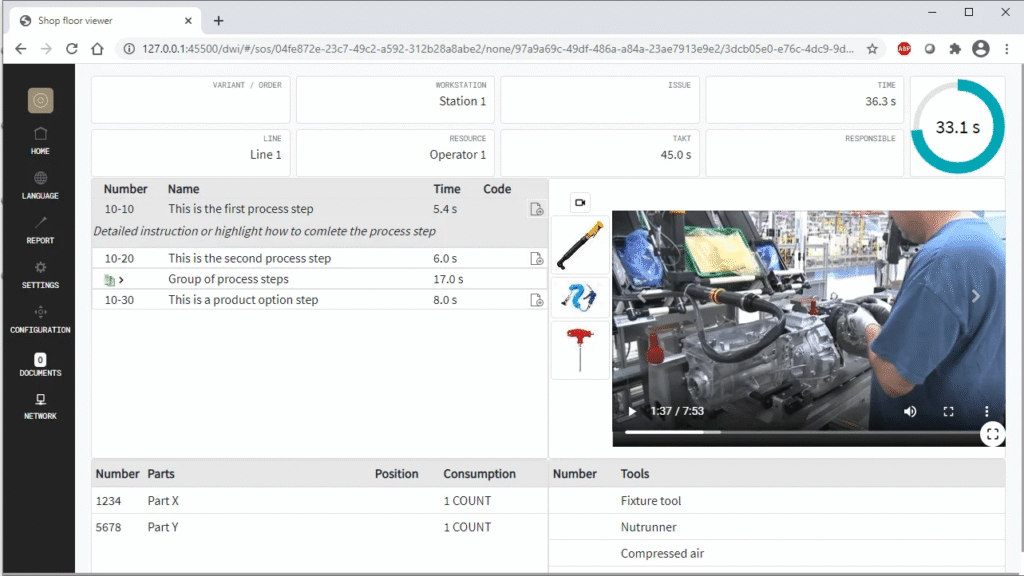
AVIX Shop Floor Viewer is a software solution that enables the display of digital and interactive work instruction directly via a web browser — on any monitors, tablets or screens in the shop floor. It represents a concrete and quickly returnable first step into the world of paperless production and Industry 4.0.
Key benefits:
1. Digital instructions available anywhere. Work procedures are displayed on networked screens directly at the workplace — without paper, outdated folders and manual distribution of documents. The operator always has the current, approved version of the instruction at hand, whether working on the production line, in assembly or during training.
2. Simple administration without duplicate data All information in AVIX is interconnected. The same data generated during time studies or line balancing is automatically translated into work instructions — without the need to update multiple files or systems. This saves hours of administrative work and minimizes the risk of human error.
3. Interactivity and video sequences The interface is designed specifically for the workshop environment — with large, clear buttons for moving forward and backward through the instruction steps. Each process step can be accompanied by a video, which is especially useful when training new operators, implementing standardized work, or conducting audits.
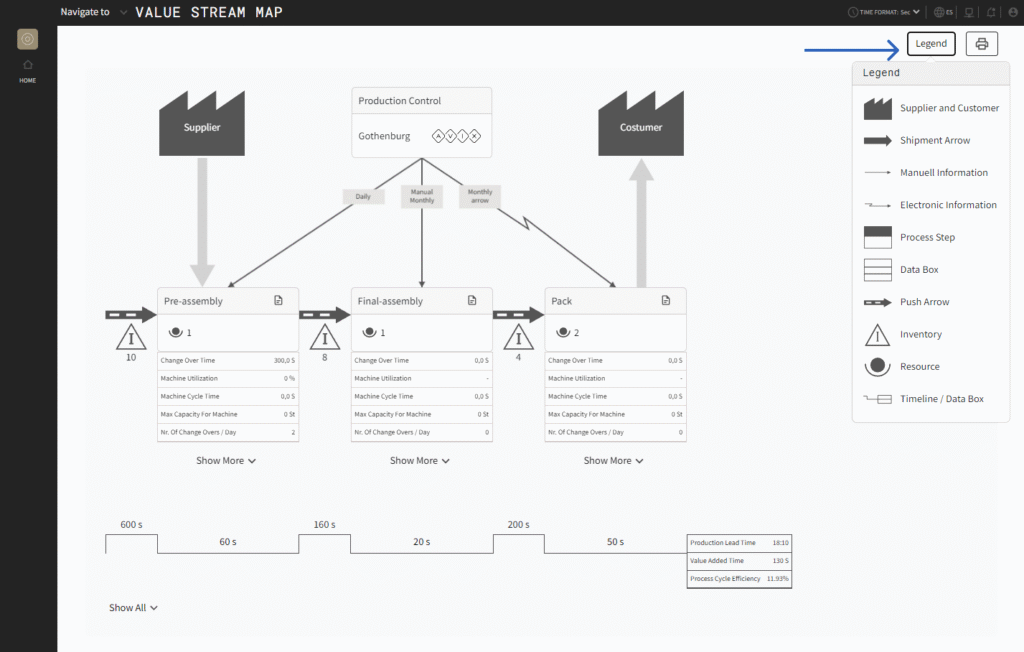
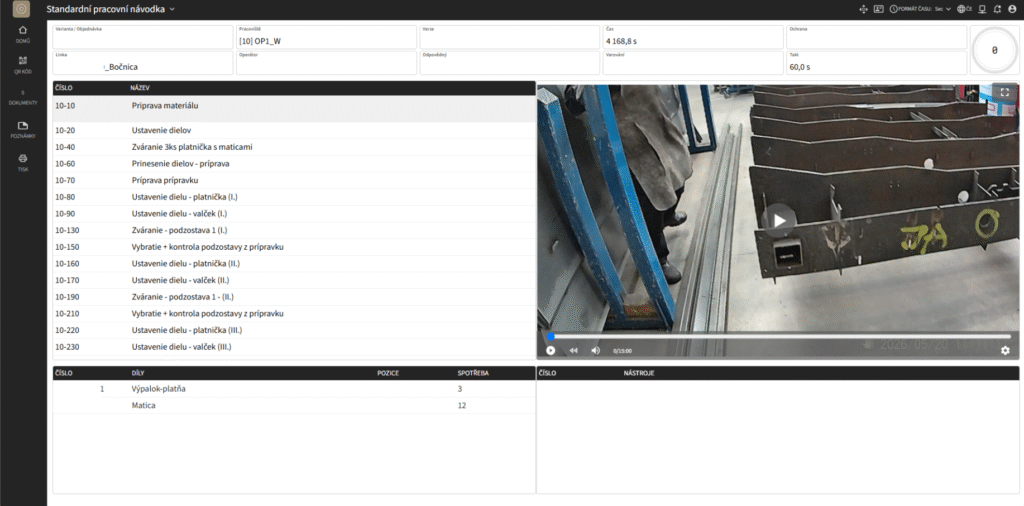
4. Always the latest version in real time AVIX Shop Floor Viewer supports real-time updates. Once a responsible worker approves a change in the process, the shop floor operator immediately sees the latest version of the instruction — without waiting, printing, or distributing paper documents.
5. Support for various types of manufacturing processes The solution is adaptable to a wide range of manufacturing environments — from manual assembly to machine maintenance to complex assembly processes with multiple product variants. Instructions can include text, images, videos, tool lists, parts lists, and product variants.
6. Integration with the entire AVIX Suite Shop Floor Viewer is not an isolated tool — is part of the comprehensive AVIX Suite ecosystem, which includes time studies, line balancing, ergonomics, FMEA and other modules. Data from one module is automatically projected into others, which ensures consistency and significantly reduces the administrative burden of the entire production and technical team.
AVIX Execution optimizer
Software for order management and improving production line performance
Order execution and optimization
AVIX Execution Optimizer helps improve production line performance by analyzing and optimizing the production plan/programs. The tool visualizes areas for improvement and facilitates decision-making on actions to streamline output. AVIX Execution Optimizer is an extension within the AVIX Resource Balance module. Thanks to Execution Optimizer, AVIX becomes even more powerful when it comes to advanced balancing, order management, order mixes, and more.
This is the AVIX Execution optimizer
- Import of orders/plans for assembly and product configurations
- Simulation without orders
- Simulated heat map using statistical distribution
- Product mix
- Creating a product mix based on orders/assembly plans
- Advanced balancing
Objavte vopred balancing issues using „heat mapy“
This is the AVIX Execution optimizer
- Import of orders/plans for assembly and product configurations
- Simulation without orders
- Simulated heat map using statistical distribution
- Product mix
- Creating a product mix based on orders/assembly plans
- Advanced balancing
Objavte vopred balancing issues using „heat mapy“
Accurate data
Traditional balancing is based on simplified forecasts or assumptions about future production. Using AVIX Execution Optimizer allows calculating the correct balance based on production programs/assembly plans, i.e., actual orders including configurations.
Overview of current production processes
The work procedure at a production station can vary significantly between different products or configurations. Depending on the production program/schedule and the production mix, this can cause undesirable effects on line balancing. AVIX Execution Optimizer helps visualize the work content/utilization of each workstation, which allows predicting problems.
Fields of application
Production planning and sequencing
Production planning and order sequencing are key components of production management.
Production planning is the process in which it is determined what will be produced, in what quantity, and over what time horizon, to achieve the most efficient use of available resources. Part of this process is also order sequencing – finding the most suitable sequence of customer requirements to increase production efficiency and reduce the risk of delays. Mutual coordination of these steps ensures smooth production flow, meeting deadlines, proper capacity utilization, and alignment of demand with production capabilities, leading to fulfillment of customer expectations.

How can AVIX help with production planning and sequencing?
AVIX provides modern sequencing without intuition and chaos
Thanks to clear handling of production and time data, it can simulate the production flow, immediately show deviations, and suggest the ideal order of orders. The optimization algorithm continuously calculates the best start for each job, so the plan can be flexibly adjusted throughout the day. Combined with planned time and efficiency functions, you get a powerful tool that balances operator workloads and improves the overall smoothness of production.
MES ERP and Integration

Integration between production management systems (MES), enterprise resource planning (ERP), and other systems, such as product lifecycle management (PLM), is crucial for efficient manufacturing workflows.
These systems cover all key areas of manufacturing – from product and process data to tools, documents, and production programs. Seamless data exchange ensures that information is consistent and immediately available across the company. Integration can be done manually or automatically, enabling more efficient operations and faster decision-making based on up-to-date data.
How can AVIX help with MES, ERP, and integration?
AVIX Connector is an open solution that easily connects AVIX with PLM, ERP, or MES systems. It ensures fast and reliable exchange of all key manufacturing data – from products to processes and documents. It allows manual or fully automated synchronization, thereby eliminating errors, saving time, and keeping data consistent across the organization. Thanks to this, it becomes an essential tool for modern, data-driven manufacturing environments.
Solutions for you
Introduction to AVIX Online
Instead of reading texts, looking at images, and searching for answers, you can see how AVIX actually works and ask about whatever interests you the most.
Pilot Project Implementation
Do you want to try AVIX on a specific task in your company? You will gain real experience of how AVIX works, what it can do, and how it can help you.
Get a Quotation
Based on your needs and requirements, we will choose the most suitable modules, adequate types of licenses and we will propose the implementation process.
Satisfied customers are the best advertisement! That’s why we decided to publish a selection of happy customers and their impressions of the AVIX software.
Special offer
Are you also wondering what the recovery will look like after an unexpected production stoppage? If you’re thinking about how to prepare for the return and want to use the waiting time efficiently, we offer you the opportunity to try the AVIX lean software with a 50% discount. In the Resource Balance module, you can prepare different production scenarios – for example, determine the required number of employees for different order levels, complete with the corresponding work instructions.

